> ## Documentation Index
> Fetch the complete documentation index at: https://docs.guidelypro.ai/llms.txt
> Use this file to discover all available pages before exploring further.
# Home
The **Home** tab is where you define the foundation of your Experience.\
It controls the objective, the first interaction, and the core structure before moving into advanced configuration.
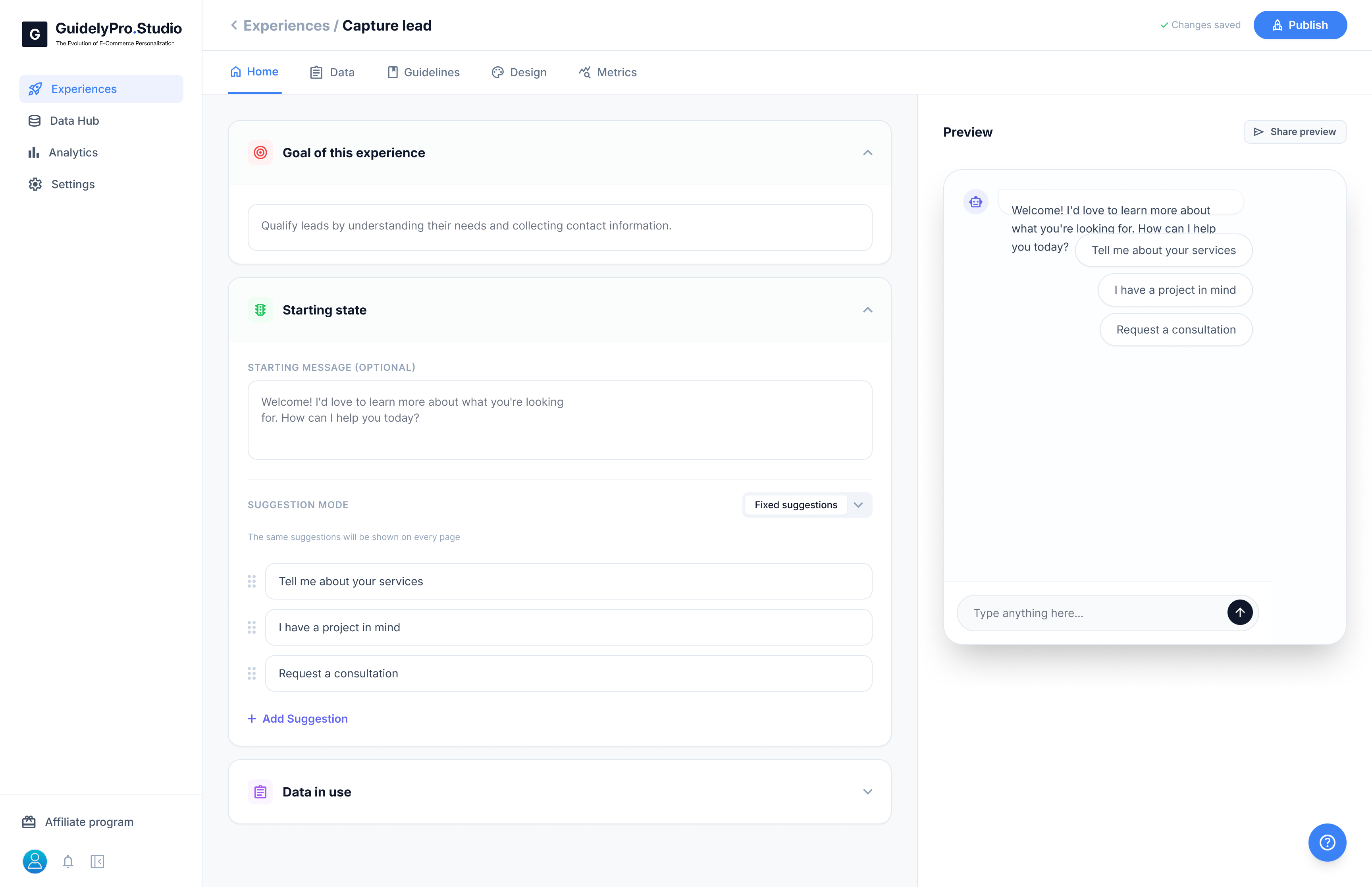 ***
### 🎯 Goal of this Experience
This is the main objective of your AI experience.
Here you clearly define what the AI should accomplish, such as:
* Qualify leads
* Recommend products
* Guide visitors toward a consultation
The goal keeps the conversation focused and aligned with your business outcome.
***
### 💬 Starting State
The Starting State defines how the experience begins.
You can set:
* The welcome message visitors see first
* The tone and style of communication
* The first interaction prompt
This is the first impression your AI makes — keep it clear and inviting.
Suggestion Mode controls the quick reply buttons shown to visitors.
You can:
* Add predefined suggestions
* Reorder them
* Choose how they appear
These buttons help guide users into structured conversations and improve engagement.
***
### 🗂 Data in Use
This section shows which data sources the experience can access.
Examples include:
* Synced Shopify product data
* Custom attributes
* Connected integrations
This ensures the AI uses accurate and relevant information when responding.
***
The **Home tab** is where you define the purpose and structure of your Experience before refining design, logic, and analytics in other tabs.
***
### 🎯 Goal of this Experience
This is the main objective of your AI experience.
Here you clearly define what the AI should accomplish, such as:
* Qualify leads
* Recommend products
* Guide visitors toward a consultation
The goal keeps the conversation focused and aligned with your business outcome.
***
### 💬 Starting State
The Starting State defines how the experience begins.
You can set:
* The welcome message visitors see first
* The tone and style of communication
* The first interaction prompt
This is the first impression your AI makes — keep it clear and inviting.
Suggestion Mode controls the quick reply buttons shown to visitors.
You can:
* Add predefined suggestions
* Reorder them
* Choose how they appear
These buttons help guide users into structured conversations and improve engagement.
***
### 🗂 Data in Use
This section shows which data sources the experience can access.
Examples include:
* Synced Shopify product data
* Custom attributes
* Connected integrations
This ensures the AI uses accurate and relevant information when responding.
***
The **Home tab** is where you define the purpose and structure of your Experience before refining design, logic, and analytics in other tabs.